Introducing the JobNab ChatGPT App
JobNab now plugs directly into ChatGPT. Tell ChatGPT which companies you want to watch, what job titles you're looking for, and where you want to work — and it will update your JobNab watchlist automatically. From there, JobNab monitors those companies' career pages directly, so you're notified the moment a new role goes live.
What JobNab does, and why pairing it with ChatGPT matters
Job listings move quickly. And the people who are getting interviews for these roles are often the ones who applied first, before they reach LinkedIn and Indeed and get buried under hundreds of applicants.
JobNab solves this by watching company career pages directly. You tell us which companies to monitor and what kind of roles you want, and we check those pages on a schedule. The moment a matching job goes live, you get alerted — usually long before it shows up on the big aggregators.
With the JobNab app installed, ChatGPT can also act on your JobNab account for you.
A few example prompts for ChatGPT:
- "What new jobs do I have? Pick the three strongest matches for my background and draft a cover letter for each."
- "Start tracking Anthropic, Cursor, and Linear's careers pages."
- "Update my tracked roles to include 'Staff Engineer' and 'Principal Engineer', but exclude anything with 'Manager' in the title."
ChatGPT handles the JobNab part. JobNab handles the watching. You stay focused on the applications.
What the app can do
The app gives ChatGPT seven tools it can use on your behalf. Read-only tools run automatically; anything that changes your account asks for your confirmation first.
| Tool | What it does |
|---|---|
add_job_tracker | Add a company career page for JobNab to monitor |
list_job_trackers | List the career pages you're currently tracking |
update_positions | Set the job title keywords JobNab matches against, plus optional blacklist words |
get_positions | Show your current positions, blacklist words, and preferred locations |
update_locations | Set preferred job locations like Remote or specific cities (Pro and Max only) |
get_latest_alerts | Fetch your 10 most recent job alerts; unread ones are flagged [NEW] |
help | Walk through what JobNab does and how to use each tool |
How to add the app
The JobNab ChatGPT app is currently in OpenAI's review queue for the public Apps Directory. Until then, you can add it manually using ChatGPT's developer mode — it's a few extra clicks, but the app itself works identically.
- Open ChatGPT and go to Settings → Apps → Advanced Settings.
- Turn on Developer Mode.
- Go back to Apps and click Create App.
- Fill in the form:
- Name: JobNab
- MCP Server URL:
https://mcp.jobnab.ai/mcp - Authentication: OAuth
- Check the box to acknowledge the custom-MCP-server notice
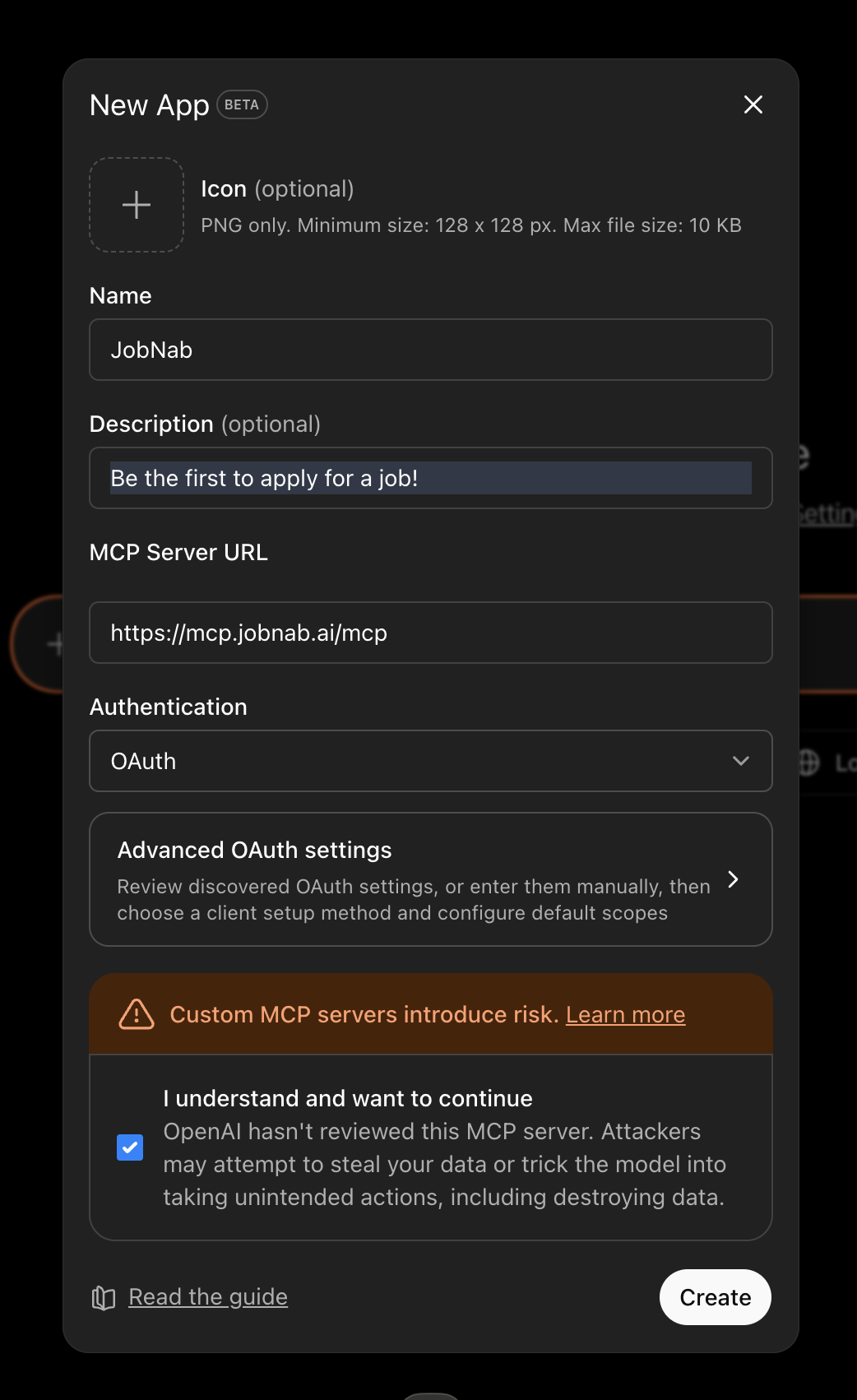
- Click Create. ChatGPT will open a popup to sign you in to JobNab — we use the same email-code login as the dashboard, no separate password to remember.
- After authorizing, start a new conversation and ask ChatGPT to do anything JobNab can do.
Once OpenAI approves JobNab for the public Apps Directory, installation will simplify to searching for JobNab and clicking Add — we'll update this post when that happens. The same app will also be available as a plugin in Codex for CLI users.
Requirements
- An active JobNab Pro or Max subscription. The app won't work on Basic or trial accounts; we'll let you know if you try.
- Location preferences specifically require Pro or Max. Basic accounts can still set positions and tracked companies through the dashboard.
Privacy and what the app can access
When you authorize the JobNab app, ChatGPT receives a token that lets it act on your JobNab account on your behalf. The app can:
- Read and modify your tracked career pages, position keywords, blacklist words, and preferred locations
- Read your job alerts
The app cannot:
- Read your ChatGPT conversation history, memory, or anything from other ChatGPT tools
- Access any other JobNab account or any data outside your own
- Make payments or change your subscription
JobNab's app stores no record of your conversations or any data that flows through it — it's a stateless bridge between ChatGPT and the same JobNab API your dashboard already uses. Authorization tokens last 24 hours and can be revoked anytime by removing the app under ChatGPT's settings.
For full details on how JobNab handles your data, see our Privacy Policy.
Support
Questions, feedback, or something not working? Email hello@jobnab.ai and we'll get back to you within a business day.
The JobNab app is built on the Model Context Protocol, the open standard for letting AI tools work with outside services.
JobNab is also available as a Claude connector if that's where you spend your time. Got an idea for another AI tool we should support? Let us know.